User Guide
TenantTrack is a tool for landlords managing multiple rental properties. It helps keep track of tenant details efficiently. TenantTrack combines a command-line interface with a graphical interface, making it simple and intuitive to use.
- Quick start
-
Features
- Viewing help:
help - Adding a tenant:
add - Archiving a tenant:
archive - Clearing all entries:
clear - Deleting a tenant:
delete - Editing a tenant:
edit - Locating tenants by name:
find - Locating tenants by address:
filter - Listing all tenants:
list - Viewing address in Google Maps:
map - Marking a tenant as paid:
paid - Toggling between active and archive list:
togglearchive - Unarchiving a tenant:
unarchive - Marking a tenant as not paid:
unpaid - Exiting the program:
exit - Saving the data
- Editing the data file
- Archiving data files
[coming in v2.0]
- Viewing help:
- FAQ
- Known issues
- Command summary
Quick start
-
Ensure you have Java
17or above installed in your Computer.
Mac users: Ensure you have the precise JDK version prescribed here. -
Download the latest
.jarfile from here. -
Copy the file to the folder you want to use as the home folder for your
TenantTrack. -
Open a command terminal,
cdinto the folder you put the jar file in, and use thejava -jar TenantTrack.jarcommand to run the application.
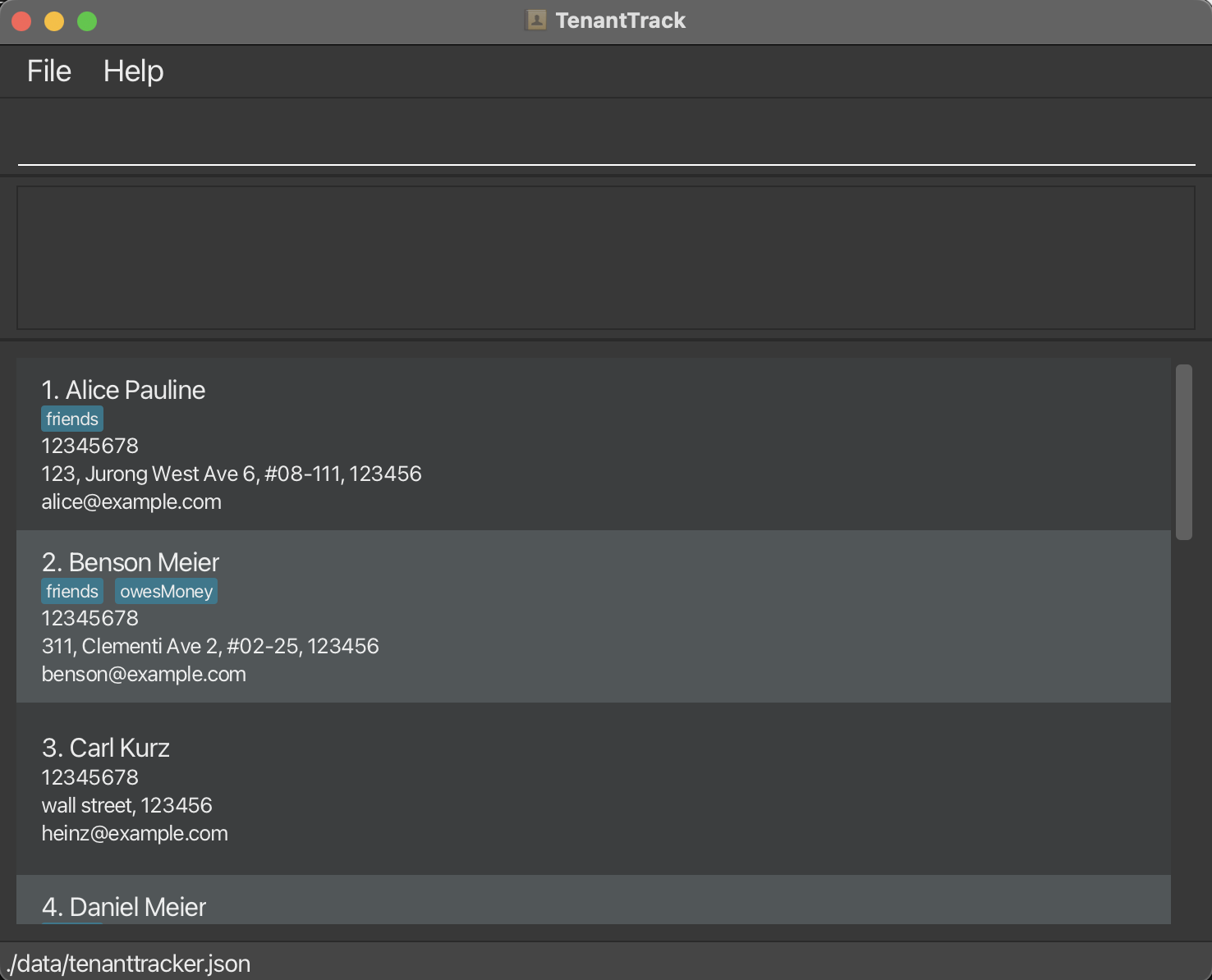
A GUI similar to the below should appear in a few seconds. Note how the app contains some sample data.
-
Type the command in the command box and press
Enterto execute it. e.g. typinghelpand pressingEnterwill open the help window.
Some example commands you can try:-
list: Lists all tenants. -
add givenN/ John familyN/ Doe phone/ 98765432 email/ johnd@example.com address/ John street, block 123, #01-01 S123456: Adds a tenant namedJohn Doe. -
delete 3: Deletes the 3rd tenant shown in the current list. -
clear: Deletes all tenants. -
exit: Exits the app.
-
-
Refer to the Features below for details of each command.
Features
 Notes about the command format:
-
Words in
UPPER_CASEare the parameters to be supplied by the user.
For example,add givenN/ GIVEN_NAME familyN/ FAMILY_NAMEcan be used asadd givenN/ John familyN/ Doe. - Items in square brackets are optional.
For example,givenN/ GIVEN_NAME [tag/TAG]can be used as
-
givenN/ John tag/ friend, OR -
givenN/ John.
-
- Items with
… after them can be used multiple times including zero times.
For example,[tag/TAG]…can be used as
- ` ` (i.e. 0 times), OR
-
tag/friend, OR -
tag/friend tag/family, - Etc.
-
Parameters can be in any order.
For example, if the command specifies:givenN/GIVEN_NAME phone/PHONE_NUMBER,
it will also accept:phone/PHONE_NUMBER givenN/GIVEN_NAME. -
Unnecessary parameters for commands that do not take in parameters (such as
help,list,exitandclear) will be ignored.
For example, if the command specifieshelp 123, it will be interpreted ashelp. - If you are using a PDF version of this document, be careful when copying and pasting commands that span multiple lines as space characters surrounding line-breaks may be omitted when copied over to the application.
Viewing help: help
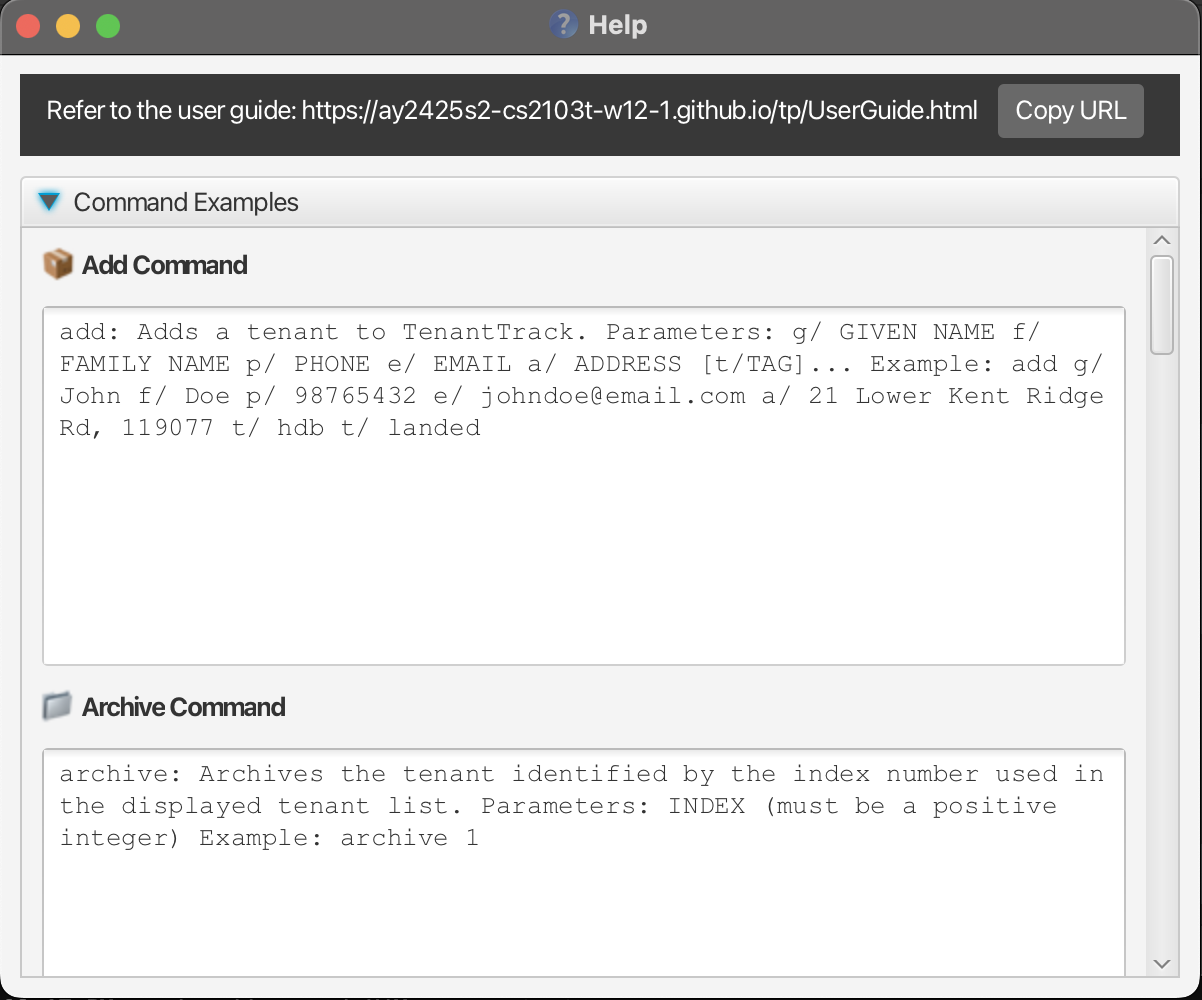
Shows a message explaining how to access the help page.
Format:
help
Adding a tenant: add
Adds a tenant to the Tenant Track.
Format:
add givenN/ John familyN/ Doe phone/ 98765432 email/ johnd@example.com address/ John street, block 123, #01-01 S123456
Details:
- Phone number must be a valid Singaporean 8-digit number.
- Emails must be a valid email, for example
address@domain.com. - Address must contain a valid 6-digit postcode within it. It must be a word of its own formatted as
SABXXXXwhere:-
Sis the string"S"a prefix for standardisation. -
ABis a postal zone, which can be any 2-digit number from01-82, excluding74 -
XXXXXXis any 4 digits. - One example valid address is:
NUS School of Computing, COM1, 13, Computing Dr, S117417.
-
- Arguments/Prefixes should adhere to the specified order and format above.
 Tip:
A tenant can have any number of tags (including 0).
Tip:
A tenant can have any number of tags (including 0).
Examples:
add givenN/ John familyN/ Doe phone/ 98765432 email/ johnd@example.com address/ John street, block 123, #01-01 S123456-
add givenN/ Sam familyN/ Wilson phone/ 87543213 email/ samw@example.com address/ Sam street, block 321, #02-04 S456423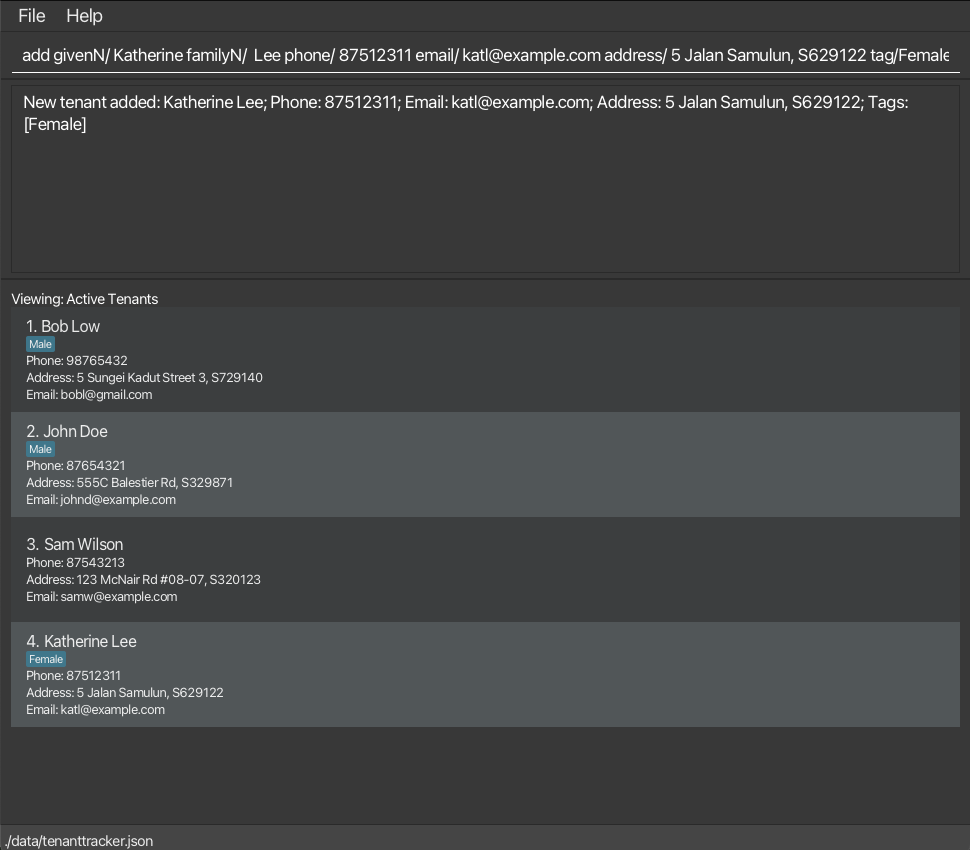
Archiving a tenant: archive
Archive the specified tenant from the Tenant Track.
Format:
archive INDEX
Details:
- Archive the tenant at the specified
INDEX. -
INDEXindex refers to the index number shown in the active tenant list. -
INDEXmust be a positive integer 1, 2, 3, … - Archiving works on the active list from both the dsiplayed active list and the displayed archive list.
Examples:
-
listfollowed byarchive 2archives the 2nd tenant in the Tenant Track. -
find Bobfollowed byarchive 1archives the 1st tenant in the results of thefindcommand.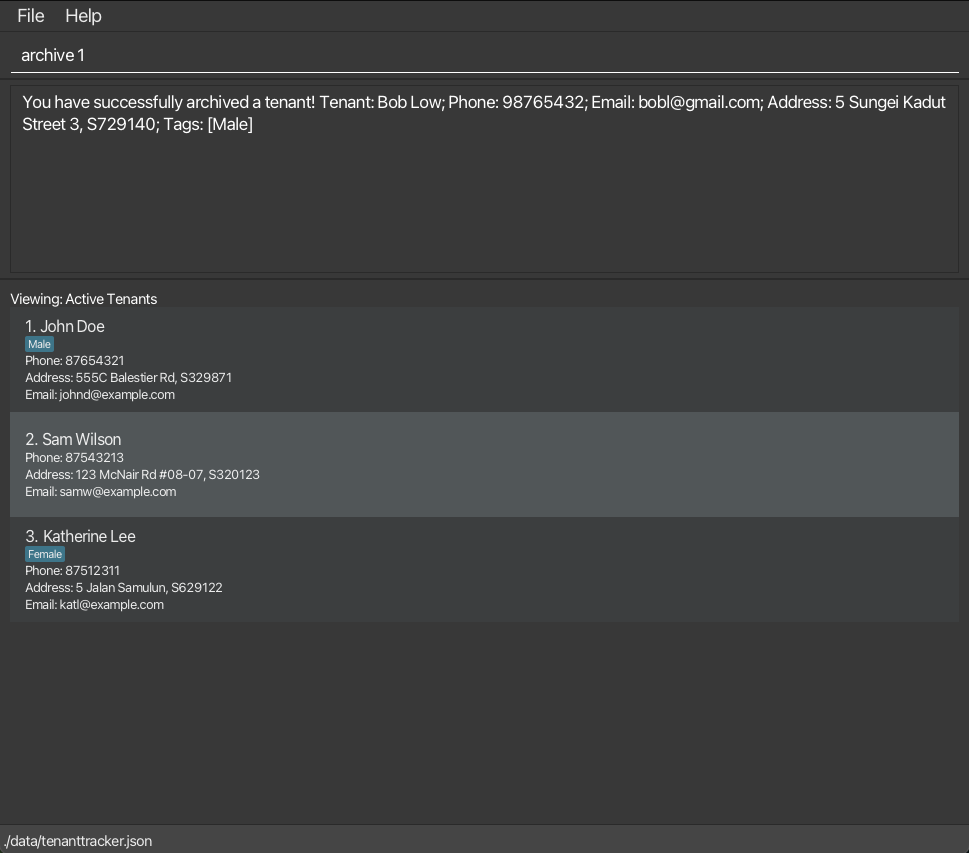
Clearing all entries: clear
Clears all entries from the Tenant Track.
Format:
clear
Deleting a tenant: delete
Deletes the specified tenant from the Tenant Track.
Format:
delete INDEX
Details:
- Deletes the tenant at the specified
INDEX. -
INDEXindex refers to the index number shown in the active tenant list. -
INDEXmust be a positive integer 1, 2, 3, …
Examples:
-
listfollowed bydelete 2deletes the 2nd tenant in Tenant Track. -
find Betsyfollowed bydelete 1deletes the 1st tenant in the results of thefindcommand.
Editing a tenant: edit
Updates the details of an existing tenant in the list.
Format:
edit INDEX [givenN/GIVEN_NAME familyN/FAMILY_NAME] [phone/PHONE] [email/EMAIL] [address/ADDRESS] [tag/TAG]...
Details:
- Edit the tenant at the specified
INDEX. -
INDEXindex refers to the index number shown in the active tenant list. -
INDEXmust be a positive integer 1, 2, 3, … - You must specify at least one field to update.
- Specified fields will replace the tenant’s existing values.
-
givenN/andfamilyN/must both be present if editing name
On editing tags:
-
All existing tags will be cleared and replaced with the new ones.
-
To remove all tags, type tag/ without specifying any tag after it.
Examples:
-
edit 2 givenN/ Betsy familyN/ Crower tag/updates the name of the second tenant and clears all tags. -
edit 1 phone/ 91234567 email/ johndoe@example.comupdates the phone number and email of the first tenant.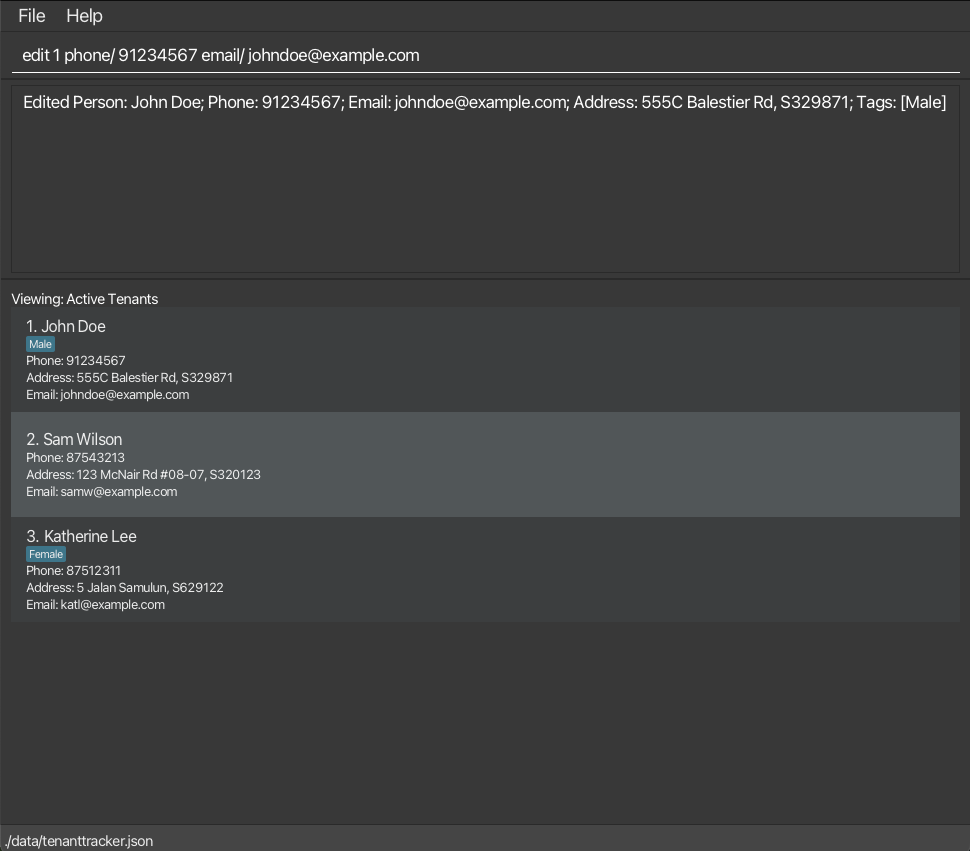
Locating tenants by name: find
Finds tenants whose names contain ANY of the given keywords.
Format:
find KEYWORD [MORE_KEYWORDS]
Details:
- The search is NOT case-sensitive. For example,
hanswill matchHans. - The order of the keywords does not matter. For example,
Hans Bowill matchBo Hans. - Only the name in the active tenant list is searched.
-
Prefixes of words will be matched. For example, a tenant with
Hanin his name will satisfy the commandfind Hans. However, a tenant withansin his name will NOT satisfy the commandfind Hans. - Tenants matching at least one keyword will be returned (i.e.
ORsearch). For example,Hans Bowill returnHans Gruber,Bo Yang.
Examples:
-
find JohnreturnsjohnandJohn Doe. -
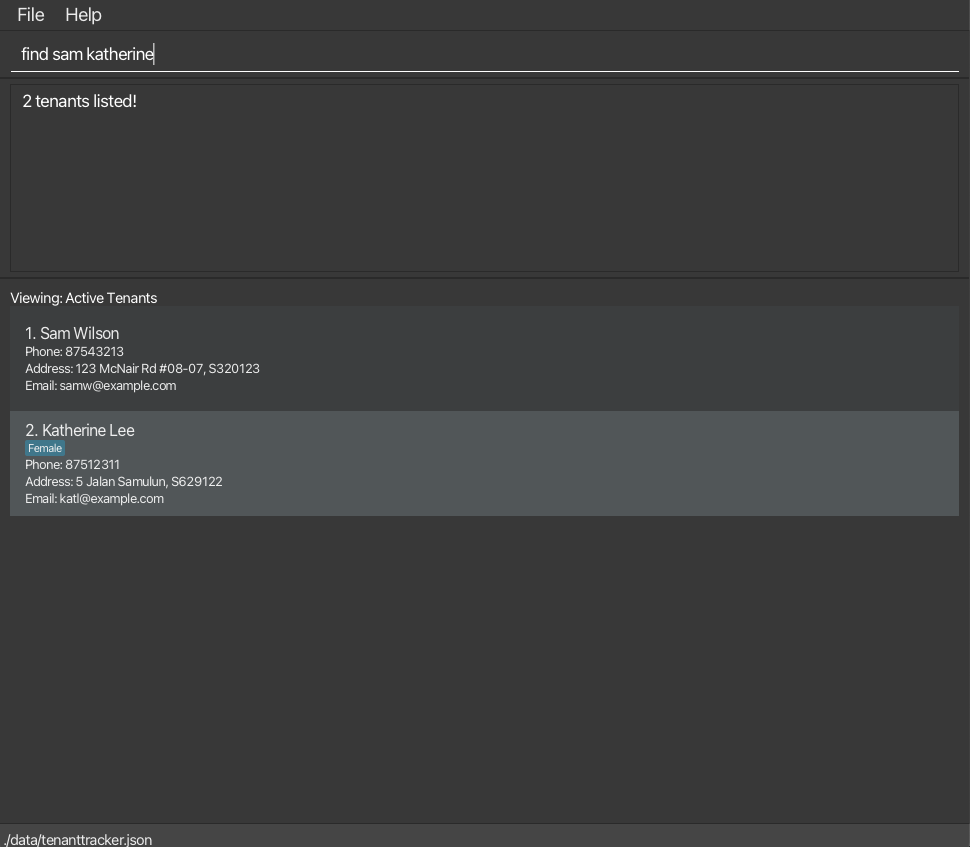
find sam katherinereturnsSam Wilson,Katherine Lee.
Locating tenants by address: filter
Filters the list for tenants whose address contains any of the given keywords.
Format:
filter KEYWORD [MORE_KEYWORDS]
Details:
- The search is NOT case-sensitive. For example,
Lower Kent Ridgewill matchlower kent ridge. - The order of the keywords does not matter. For example,
Kent Ridge Lowerwill matchLower Kent Ridge. - Only the address in the active tenant list is searched.
-
Prefixes of words or postal codes will be matched. For example, an address with
Kentin it will satisfy the commandfilter Kenand an address withS229220in it will satisfy the commandfilter S229. However, an address withentin it will NOT satisfy the commandfilter Kent. - Tenants with addresses matching at least one keyword will be returned (i.e.
ORsearch). For example,Lower Kent Ridgewill returnLower Arab Street,Kent Ridge.
Examples:
-
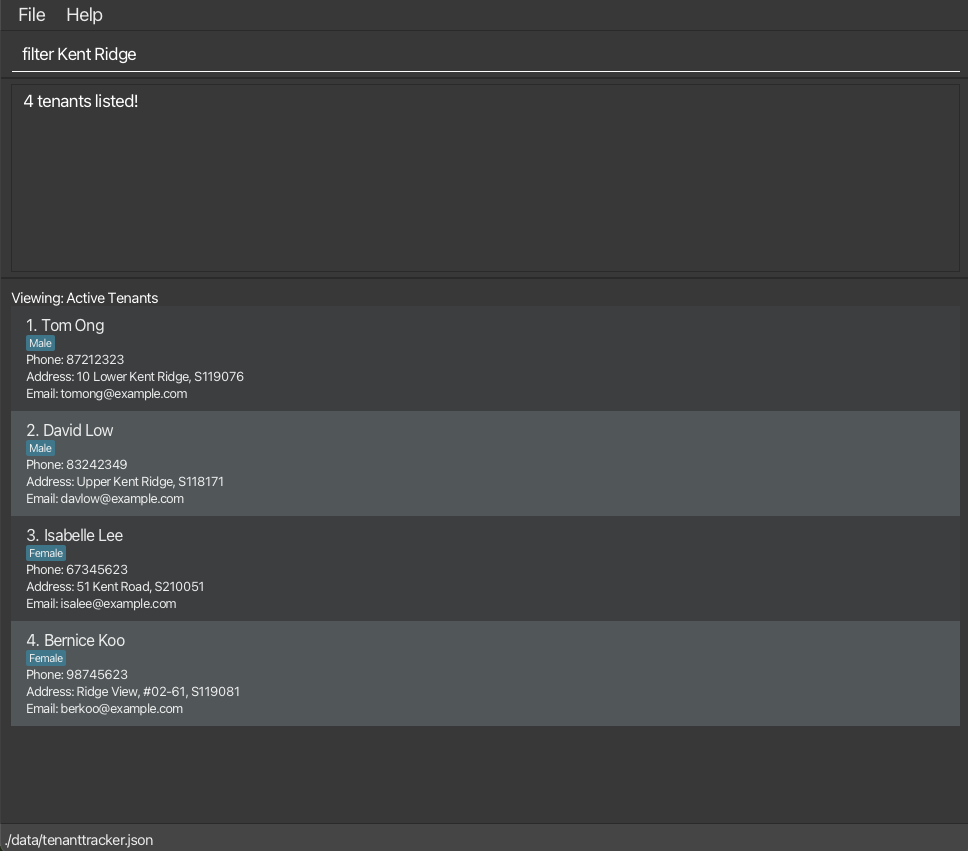
filter Kent Ridgereturn tenants with addressesLower Kent Ridge,Upper Kent Ridge,Kent RoadandRidge View.
 Caution:
When filtering based on a single KEYWORD, take note to remove any trailing commas from the keyword.
Caution:
When filtering based on a single KEYWORD, take note to remove any trailing commas from the keyword.
Listing all tenants: list
Shows a list of all tenants in the Tenant Track.
Format:
list
Viewing address in Google Maps: map
Opens the specified tenant’s address in Google Maps.
Format:
map INDEX
Details:
- Searches the tenant at the specified
INDEX’s address. -
INDEXindex refers to the index number shown in the active tenant list. -
INDEXmust be a positive integer 1, 2, 3, … -
Mapcommand will input the address directly into the api call, Google Maps will handle which location is closest to the exact given input.
Examples:
-
listfollowed bymap 2searches the 2nd tenant in Tenant Track’s address in Google Maps. -
find Tomfollowed bymap 1searches the 1st tenant in the results of thefindcommand’s address in Google Maps.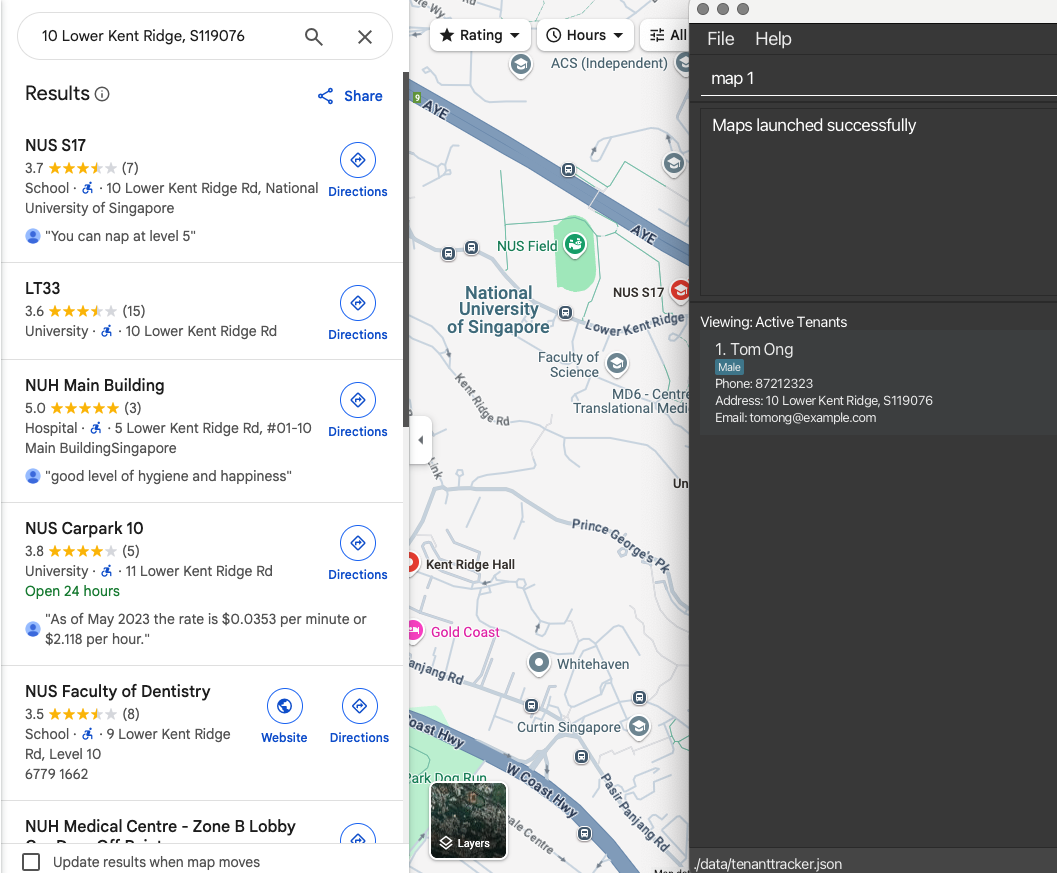
Marking a tenant as paid: paid
Marks a tenant as paid with a paid icon based on phone number.
Format:
paid PHONE
Details:
- Searches the tenant with the specified phone number in the active tenant list.
- The phone number should be a valid Singaporean phone number exactly 8 digits long and starting with 6, 8 or 9.
- If the phone number does not belong to any tenant, an error message is returned.
Examples:
-
paidfollowed by91234567adds a paid icon to the tenant with the phone number:91234567.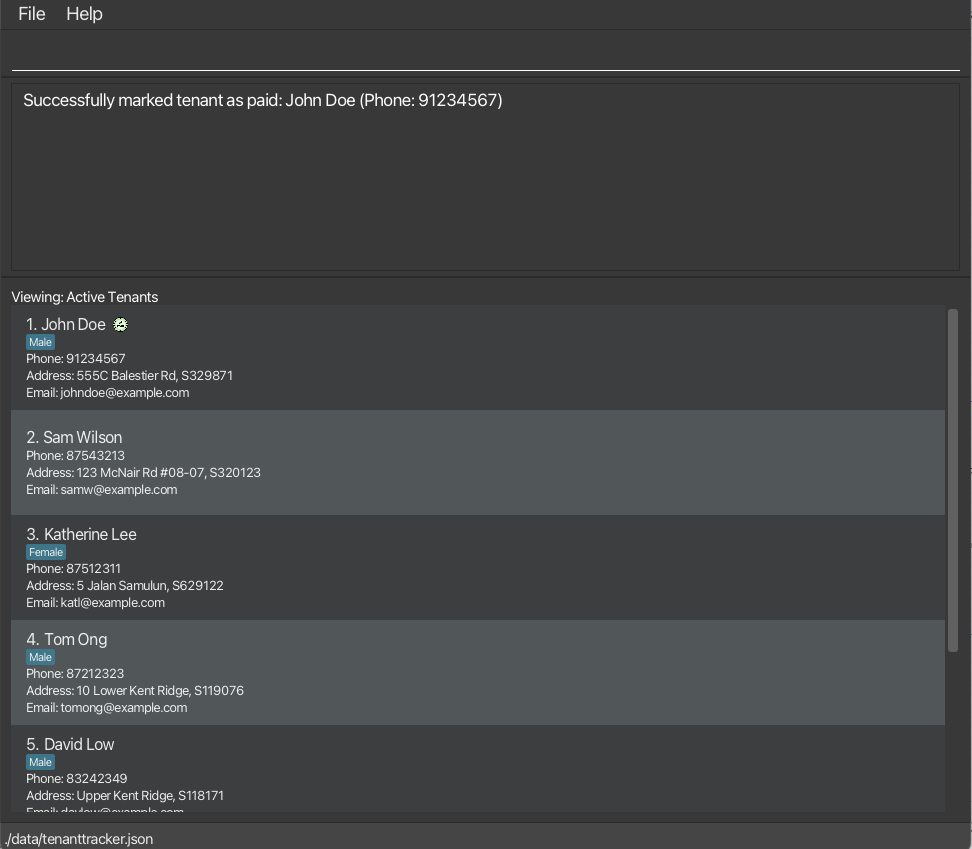
Toggling between active and archive list: togglearchive
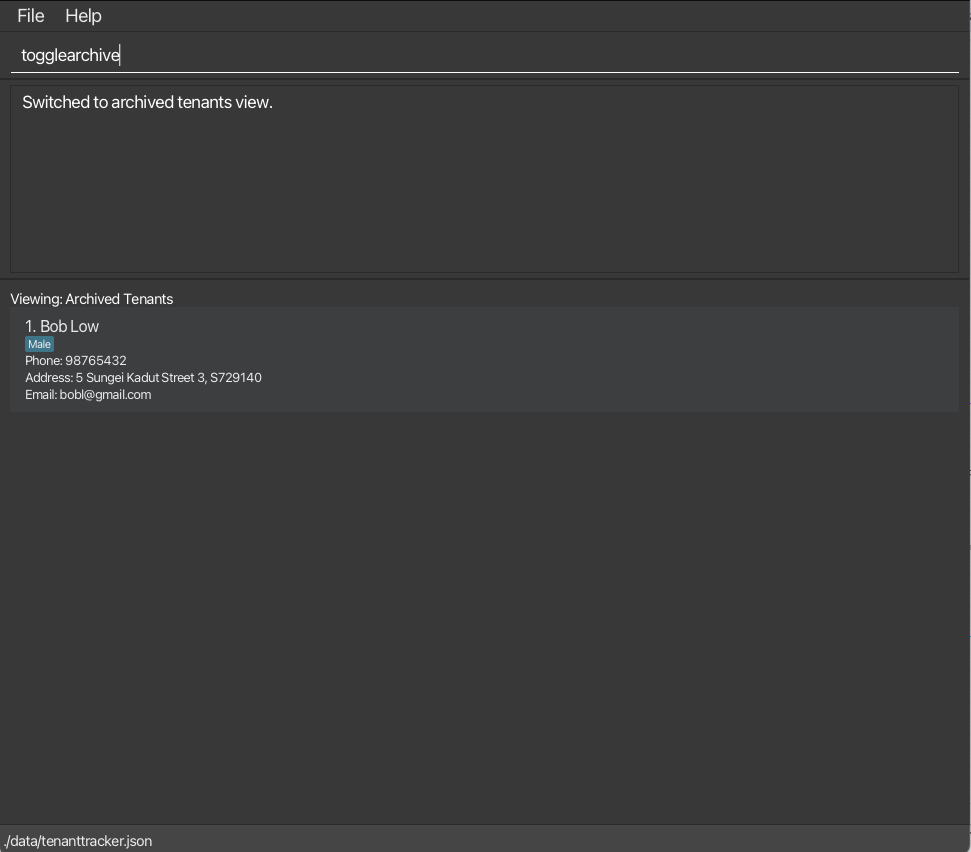
Changes the current list to either the displayed active list or the displayed archive list.
Format:
togglearchive
Details:
- Only the
unarchivecommand works on the tenants in the archived list.
Examples:
-
togglearchiveswitches to the archive list if active list was displayed before the command.
Unarchiving a tenant: unarchive
Unarchive the specified tenant from the archive list of Tenant Track.
Format:
unarchive INDEX
Details:
- Unarchive the tenant at the specified
INDEX. -
INDEXindex refers to the index number in the archived tenant list. -
INDEXmust be a positive integer 1, 2, 3, … - Unarchiving works on the archived list from both the displayed active list and the displayed archive list.
Examples:
-
togglearchivefrom the active list, followed byunarchive 2unarchives the 2nd tenant in the archived Tenant Track. - ‘unarchive 2’ from the archived list unarchives the 2nd tenant in the archived Tenant Track.
- ‘unarchive 2’ from the active list unarchives the 2nd tenant in the archived Tenant Track.
Marking a tenant as not paid: unpaid
Marks a tenant as not paid based on phone number. The paid icon is removed from the tenant details.
Format:
unpaid PHONE
Details:
- Searches the tenant with the specified phone number in the active tenant list.
- The phone number should be a valid Singaporean phone number exactly 8 digits long and starting with 6, 8 or 9.
- The phone number should belong to a tenant that has paid.
Examples:
-
unpaidfollowed by87654321removes the paid icon from the tenant with the phone number:87654321.
Exiting the program: exit
Exits the program.
Format:
exit
Saving the data
TenantTrack data is saved in the hard disk automatically after any command that changes the data. There is no need to save manually.
Editing the data file
TenantTrack data is saved automatically as a JSON file [JAR file location]/data/tenanttracker.json. Advanced users are
welcome to update data directly by editing that data file.
Caution:
If your changes to the data file makes its format invalid, TenantTrack will discard all data and start with an empty data file at the next run. Hence, it is recommended to take a backup of the file before editing it.Furthermore, certain edits can cause the TenantTrack to behave in unexpected ways (e.g., if a value entered is outside of the acceptable range). Therefore, edit the data file only if you are confident that you can update it correctly.
Archiving data files [coming in v2.0]
Details coming soon …
FAQ
Q: How do I transfer my data to another Computer?
A: Install the app in the other computer and overwrite the empty data file it creates with the file that contains
the data of your previous TenantTrack home folder.
Q: What should I do if I encounter an error while running the application?
A: Ensure that you have the correct version of Java installed. If the issue persists, check the error message for
details and refer to the GitHub Issues page to see if it has
already been reported. You can also create a new issue with a detailed description of the problem.
Q: Can I use TenantTrack on operating systems other than macOS?
A: Yes, TenantTrack is compatible with Windows, macOS, and Linux, as long as Java 17 or above is installed.
Q: Is there a way to recover deleted tenants?
A: No, once a tenant is deleted, the action cannot be undone. It is recommended to double-check before executing
the delete command. However, you can re-add the removed tenant using an add command.
Q: Why does the application start with sample data?
A: The sample data is included to help new users understand how the application works. You can clear the sample data
using the clear command.
Q: Can I run multiple instances of TenantTrack simultaneously?
A: It is not recommended to run multiple instances of TenantTrack using the same data file, as this may lead to data
corruption.
Known issues
-
When using multiple screens, if you move the application to a secondary screen, and later switch to using only
the primary screen, the GUI will open off-screen. The remedy is to delete the
preferences.jsonfile created by the application before running the application again. -
If you minimize the Help Window and then run the
helpcommand (or use theHelpmenu, or the keyboard shortcutF1) again, the original Help Window will remain minimized, and no new Help Window will appear. The remedy is to manually restore the minimized Help Window.
Command summary
| Action | Format | Examples |
|---|---|---|
| Add | add givenN/ GIVEN NAME familyN/ FAMILY NAME address/ ADDRESS phone/PHONE email/EMAIL |
add givenN/ John familyN/ Doe address/ 21 Lower Kent Ridge Rd, S119077 phone/ 81923121 email/ johnd@example.com |
| Archive | archive INDEX |
archive 1 |
| Clear | clear |
|
| Delete | delete INDEX |
delete 3 |
| Edit | edit INDEX [givenN/GIVEN_NAME] [familyN/FAMILY_NAME] [phone/PHONE_NUMBER] [email/EMAIL] [address/ADDRESS] [tag/TAG]… |
edit 2 givenN/ James familyN/ Lee email/ jameslee@example.com |
| Find | find KEYWORD [MORE_KEYWORDS] |
find James Jake |
| Filter | filter KEYWORD [MORE_KEYWORDS] |
filter Lower Kent Ridge |
| List | list |
|
| Paid | paid phone/PHONE |
paid 87654321 |
| ToggleArchive | togglearchive |
|
| Unarchive | unarchive INDEX |
unarchive 1 |
| UnPaid | unpaid phone/PHONE |
unpaid 87654321 |
| Help | help |